


You can change a photo into a line drawing very easily in Photoshop. All you need is an image. It can be done in a few steps in any version.

Step 1 : I have opened this free stock photo.

Step 2 : Press CTRL+J twice. The Background Layer will be duplicated into Layer 1 and Layer 1 copy.
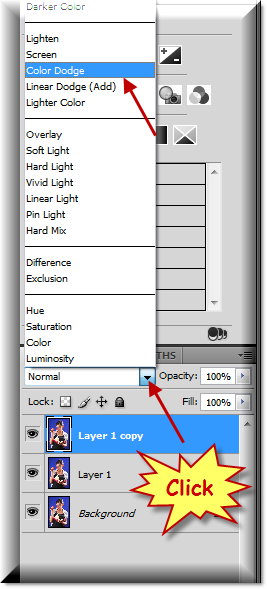
Step 3 : Now click where the arrow points to. This will reveal the Blend Modes. Click on Color dodge.

This is
how my image looks.

Step 4 : Press CTRL+I. And, this is how my image looks.

Step 5 : Go to Filter>Blur>Gaussian Blur.

Step 6 : In the Gaussian Blur dialogue box you can drag the Radius slider to determine the effect that looks good to you. I have put the Radius at 6.3. You can see the effect I have got at the left.

Step 7 I am increasing the Radius to 10 pixels.

And, this is effect I have got. That is all. Try it out.
Other Photoshop tutorials are here.


